
Scrivener has been the serious writer's workhorse for years, and for good reason. Nothing else packs the same depth of project management into one app. But two complaints come up again and again: the learning curve is steep, and the interface feels dated and crowded.
If any of that describes you, you are not looking to leave Scrivener because it is weak. You are looking for the same organization with less friction. This guide compares the best Scrivener alternatives in 2026, honestly, including where each one wins and where it falls short.
Short answer: If you want Scrivener-style organization with a gentler learning curve, look at QuillSpace (Windows and Mac, one-time purchase) or Dabble (cloud-first, subscription). Obsidian is the best free option if you are willing to set it up yourself, and Atticus fits best if formatting the finished book matters most. The table below compares the main options.
| App | Platforms | Manuscript structure | Price model | Best for |
|---|---|---|---|---|
| Scrivener | Windows, Mac, iOS | Deepest: binder, corkboard, outliner, compile | $59.99 one-time per platform | Maximum power, if you accept the learning curve |
| Obsidian | Every major platform | None built in, needs plugins and setup | Free | Tinkerers who want zero cost |
| Dabble | Cloud-first, in the browser | Yes, with plotting and goals | Subscription | Simplicity, if you do not mind a recurring bill |
| Atticus | Browser-based | Light, focused on formatting | One-time | Self-publishers formatting the finished book |
| bibisco | Windows, Mac, Linux | Yes, guided novel structure | Free community edition | Structure-loving novelists who want free, offline software |
| Ulysses | Mac, iPhone, iPad only | Project library, light on planning | Subscription | Apple-only writers who want focus over planning |
| QuillSpace | Windows and Mac (separate apps, purchased separately) | Yes: groups, sub-groups and sheets you drag to reorder | Free to start. Lifetime $49.99 on Windows or Mac | Scrivener-style organization you can learn in an afternoon |
What you are actually replacing
It helps to be clear about what makes Scrivener worth keeping, so you do not trade down by accident. Three things matter most:
- Real manuscript structure. The binder holds chapters, scenes, research, and notes in one place, and you can rearrange a whole book by dragging pieces around.
- Planning tools. The corkboard and outliner let you see a story from above, not just one document at a time.
- Compile. Scrivener turns your manuscript into a formatted manuscript, ePub, or PDF at the end.
A real alternative has to cover at least the first point. Many apps that call themselves Scrivener alternatives are just text editors with folders, and you will outgrow them on a long project. The other thing worth fixing while you switch: owning your files in a plain, portable format, rather than inside a format only one app can open.
The honest shortlist
Obsidian (free)
Obsidian stores everything as plain Markdown on your own disk, is free, and runs on every platform. For file ownership and price, nothing beats it.
Where it falls short: it is a notes app you bend into a writing tool. There is no built-in manuscript structure, corkboard, or compile, and getting it to behave like a writing studio means stacking plugins and learning its ways. Powerful for tinkerers, heavy for everyone else.
Best for: writers who enjoy building their own system and want zero cost.
Dabble (subscription)
Dabble markets itself as Scrivener without the learning curve, and it delivers a clean, modern interface with plotting and goal tracking. It is genuinely easy to pick up.
Where it falls short: it is cloud-first and subscription-only, so you are renting the tool and your manuscript lives on someone else's server by default.
Best for: writers who want simplicity and do not mind a recurring bill.
Atticus (one-time, web-based)
Atticus combines writing with strong book formatting, so you can draft and produce a clean ePub or print file in one place. It is a one-time purchase.
Where it falls short: it is browser-based and leans toward formatting and self-publishing rather than deep drafting organization. Worldbuilding and research tooling are light.
Best for: self-publishers who care most about formatting the finished book.
bibisco (free / open-source)
bibisco is built specifically for novel structure: character profiles, chapters, scenes, and timeline, with a free community edition.
Where it falls short: the interface is functional rather than polished, and its guided structure can feel rigid if you do not plan that way.
Best for: structure-loving novelists who want free, offline software.
Ulysses (Apple only, subscription)
Ulysses is the minimalist's pick: a beautiful Markdown editor with a project library. If you are fully on Apple hardware and happy with a subscription, it is lovely to write in.
Where it falls short: Apple only, subscription only, and lighter on novel planning than Scrivener. If you are on Windows it is not an option at all; see our Ulysses for Windows guide.
Best for: Apple-only writers who want focus over heavy planning.
QuillSpace (one-time, Windows and Mac)
QuillSpace is the closest match for the specific writer this guide is about: someone who wants Scrivener's organization without the complexity or the dated interface.
It gives you a visible folder structure for chapters, scenes, and notes, a focus mode for drafting, and a clean editor you can pick up in an afternoon. Three things set it apart for a Scrivener refugee:
- You can learn it in an afternoon. Groups for chapters, characters and research, sheets you drag to reorder, and a clean three-pane workspace instead of a crowded studio. See how the organization works.
- You own your files. Your work is saved as plain text files on your own computer, readable and movable, not sealed inside a proprietary container.
- It costs less than one Scrivener license. On Windows, a $49.99 lifetime license (or $14.99 per year). On Mac, a $49.99 one-time purchase. Windows and Mac are separate apps, purchased separately.
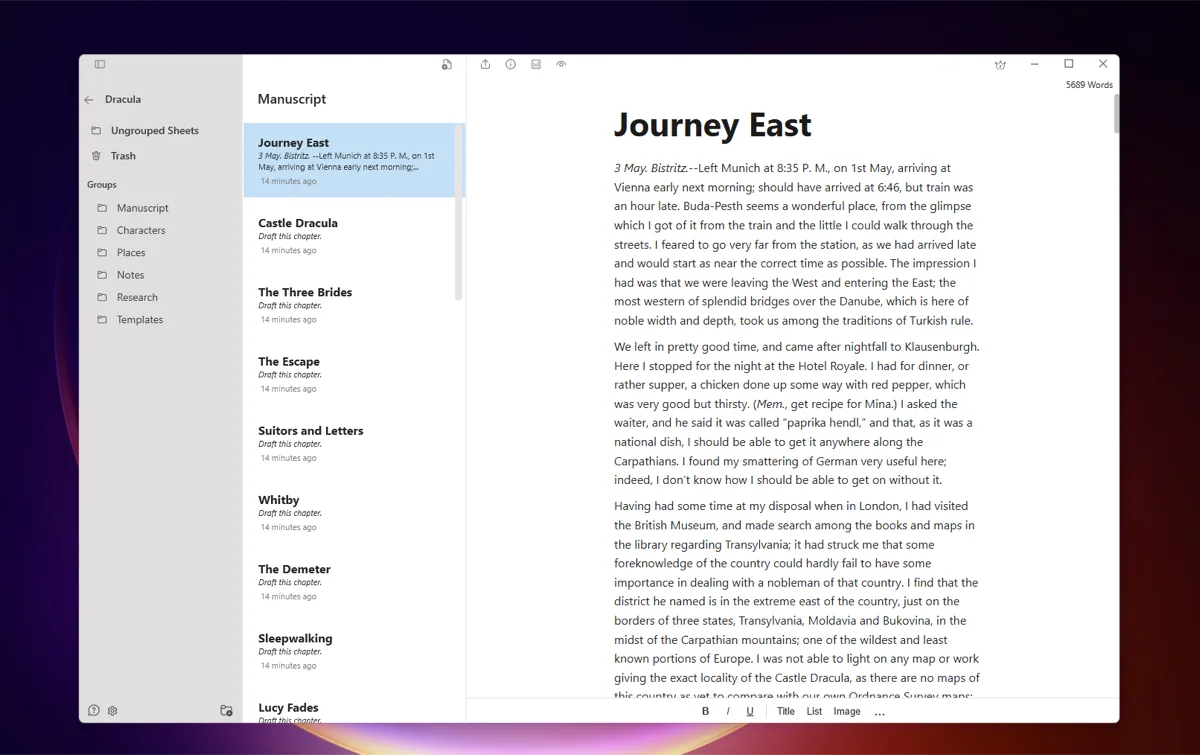
You write in a clean visual editor, and on Windows you can switch to a Markdown editor if that is how you think. It does not try to match Scrivener feature for feature: there is no deep corkboard-style planning suite. If elaborate plotting tools are the reason you use Scrivener, keep Scrivener. If the organization is what you want and the complexity is what you are escaping, this is built for exactly that.
Best for: novelists and long-form writers who want Scrivener-style organization, owned outright, on Windows or Mac, without the learning curve.
How to choose
- If you want the deepest planning suite and do not mind the learning curve, keep Scrivener. It is still the most powerful option.
- If you want zero cost and enjoy assembling your own setup, use Obsidian.
- If you mainly care about formatting the finished book, look at Atticus.
- If you want simple and modern and do not mind a subscription, try Dabble.
- If you want Scrivener's organization without the complexity, owned outright for less than a Scrivener license, on Windows or Mac, try QuillSpace.
There is no single right answer, only the one that fits how you work. The good news is that leaving Scrivener no longer means giving up structure.
Frequently asked questions
Is there a free Scrivener alternative?
Yes. Obsidian is free and stores everything as plain files on your own disk, and bibisco has a free open-source edition built around novel structure. Both trade some polish or ease of use for the zero price. If you would rather own a paid tool outright than rent one, QuillSpace is a one-time purchase instead of a subscription.
What is the best Scrivener alternative for Windows?
Most of the tools here run on Windows, including Obsidian, Dabble, and QuillSpace. QuillSpace is worth a look if you want Scrivener-style organization that you can learn quickly: its Windows lifetime license is $49.99, less than Scrivener's $59.99 Windows license.
Is there a Scrivener alternative you only pay for once?
Scrivener itself is a one-time purchase, but you pay $59.99 for each platform. Among the alternatives, QuillSpace has a one-time lifetime license ($49.99 on Windows and on Mac, each platform bought separately), and Atticus is one-time and web-based. Dabble and Ulysses are subscription.
Is there a simpler Scrivener alternative?
The learning curve is the most common reason writers leave. Dabble and QuillSpace both aim for Scrivener-style organization with a much gentler interface you can pick up in an afternoon.
Can I move my Scrivener manuscript to another app?
Usually yes. Scrivener can compile or export to common formats like DOCX, RTF, and plain text or Markdown, which most alternatives import. Expect to redo some structure and formatting by hand, since project layouts do not transfer one to one.
Free to start. Windows and Mac are separate apps, purchased separately.
Want the direct head-to-head instead? Read QuillSpace vs Scrivener.
Disclosure: This article is published by QuillSpace. We have done our best to keep the comparison fair, including pointing you to other tools when they fit better. Pricing and platform details for other apps are current as of October 2026 and may change; check each developer's site for the latest.
Last updated: October 6, 2026