
Scrivener has been the serious writer's workhorse for years, and for good reason. Nothing else packs the same depth of project management into one app. But two complaints come up again and again: the learning curve is steep, and the interface feels dated and crowded. There is a third, quieter frustration too. Scrivener sells a separate license for each platform, so if you write on a Windows laptop and a Mac at home, you buy it twice.
If any of that describes you, you are not looking to leave Scrivener because it is weak. You are looking for the same organization with less friction. This guide compares the best Scrivener alternatives in 2026, honestly, including where each one wins and where it falls short.
What you are actually replacing
It helps to be clear about what makes Scrivener worth keeping, so you do not trade down by accident. Three things matter most:
- Real manuscript structure. The binder holds chapters, scenes, research, and notes in one place, and you can rearrange a whole book by dragging pieces around.
- Planning tools. The corkboard and outliner let you see a story from above, not just one document at a time.
- Compile. Scrivener turns your manuscript into a formatted manuscript, ePub, or PDF at the end.
A real alternative has to cover at least the first point. Many apps that call themselves Scrivener alternatives are just text editors with folders, and you will outgrow them on a long project. The other thing worth fixing while you switch: owning your files in a plain, portable format, rather than inside a format only one app can open.
The honest shortlist
Obsidian (free)
Obsidian stores everything as plain Markdown on your own disk, is free, and runs on every platform. For file ownership and price, nothing beats it.
Where it falls short: it is a notes app you bend into a writing tool. There is no built-in manuscript structure, corkboard, or compile, and getting it to behave like a writing studio means stacking plugins and learning its ways. Powerful for tinkerers, heavy for everyone else.
Best for: writers who enjoy building their own system and want zero cost.
Dabble (subscription)
Dabble markets itself as Scrivener without the learning curve, and it delivers a clean, modern interface with plotting and goal tracking. It is genuinely easy to pick up.
Where it falls short: it is cloud-first and subscription-only, so you are renting the tool and your manuscript lives on someone else's server by default.
Best for: writers who want simplicity and do not mind a recurring bill.
Atticus (one-time, web-based)
Atticus combines writing with strong book formatting, so you can draft and produce a clean ePub or print file in one place. It is a one-time purchase.
Where it falls short: it is browser-based and leans toward formatting and self-publishing rather than deep drafting organization. Worldbuilding and research tooling are light.
Best for: self-publishers who care most about formatting the finished book.
bibisco (free / open-source)
bibisco is built specifically for novel structure: character profiles, chapters, scenes, and timeline, with a free community edition.
Where it falls short: the interface is functional rather than polished, and its guided structure can feel rigid if you do not plan that way.
Best for: structure-loving novelists who want free, offline software.
Ulysses (Apple only, subscription)
Ulysses is the minimalist's pick: a beautiful Markdown editor with a project library. If you are fully on Apple hardware and happy with a subscription, it is lovely to write in.
Where it falls short: Apple only, subscription only, and lighter on novel planning than Scrivener. If you are on Windows it is not an option at all; see our Ulysses alternative for Windows guide.
Best for: Apple-only writers who want focus over heavy planning.
QuillSpace (one-time, Windows and Mac)
QuillSpace is the closest match for the specific writer this guide is about: someone who wants Scrivener's organization without the complexity, the dated interface, or the second license.
It gives you a visible folder structure for chapters, scenes, and notes, a focus mode for drafting, and a clean editor you can pick up in an afternoon. Three things set it apart for a Scrivener refugee:
- One purchase covers Windows and Mac. Scrivener charges separately for each platform. QuillSpace does not, so writing across two machines does not cost you twice.
- You own your files. Your work is saved as plain, local files on your own machine, readable and movable, not sealed inside a proprietary container.
- One-time price. A lifetime license rather than a subscription, with a lower-cost yearly option if you would rather.
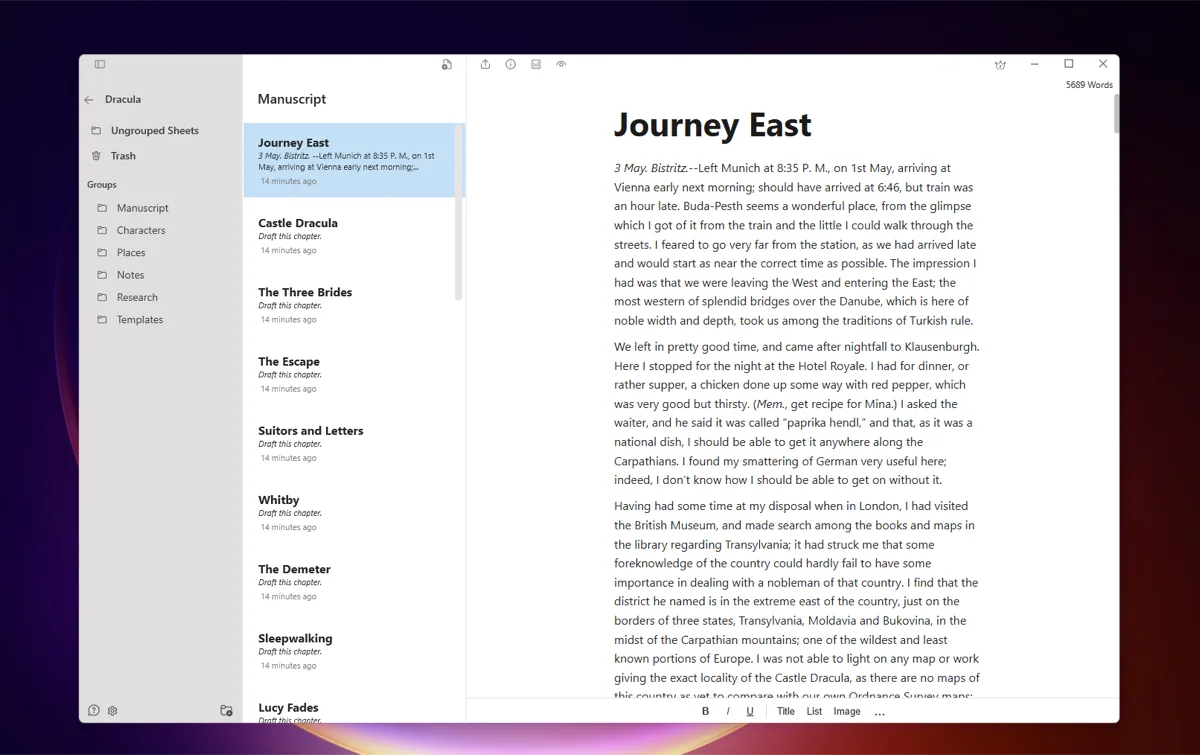
You can write in a clean visual editor, or switch to a Markdown editor if that is how you think. It does not try to match Scrivener feature for feature: there is no deep corkboard-style planning suite. If elaborate plotting tools are the reason you use Scrivener, keep Scrivener. If the organization is what you want and the complexity is what you are escaping, this is built for exactly that.
Best for: novelists and long-form writers who want Scrivener-style organization, owned outright, on Windows or Mac, without the learning curve.
How to choose
- If you want the deepest planning suite and do not mind the learning curve, keep Scrivener. It is still the most powerful option.
- If you want zero cost and enjoy assembling your own setup, use Obsidian.
- If you mainly care about formatting the finished book, look at Atticus.
- If you want simple and modern and do not mind a subscription, try Dabble.
- If you want Scrivener's organization without the complexity or the per-platform license, owned once, on both Windows and Mac, try QuillSpace.
There is no single right answer, only the one that fits how you work. The good news is that leaving Scrivener no longer means giving up structure.
Frequently asked questions
Is there a free Scrivener alternative?
Yes. Obsidian is free and stores everything as plain files on your own disk, and bibisco has a free open-source edition built around novel structure. Both trade some polish or ease of use for the zero price. If you would rather own a paid tool outright than rent one, QuillSpace is a one-time purchase instead of a subscription.
What is the best Scrivener alternative for Windows?
Most of the tools here run on Windows, including Obsidian, Dabble, and QuillSpace. QuillSpace is worth a look specifically because one purchase covers both Windows and Mac, so writing across two machines does not mean buying two licenses.
Is there a Scrivener alternative you only pay for once?
Scrivener itself is a one-time purchase, but per platform. Among the alternatives, QuillSpace is also one-time and covers Windows and Mac together, and Atticus is one-time and web-based. Dabble and Ulysses are subscription.
Is there a simpler Scrivener alternative?
The learning curve is the most common reason writers leave. Dabble and QuillSpace both aim for Scrivener-style organization with a much gentler interface you can pick up in an afternoon.
Can I move my Scrivener manuscript to another app?
Usually yes. Scrivener can compile or export to common formats like DOCX, RTF, and plain text or Markdown, which most alternatives import. Expect to redo some structure and formatting by hand, since project layouts do not transfer one to one.
Want the direct head-to-head instead? Read QuillSpace vs Scrivener.
Disclosure: This article is published by QuillSpace. We have done our best to keep the comparison fair, including pointing you to other tools when they fit better. Pricing and platform details for other apps are current as of early 2026 and may change; check each developer's site for the latest.